You can set up Google Ads yourself, but the start is exactly where the mistakes happen that send budget to clicks without sales. Here is the step-by-step process we use for clients: what to connect, where to do it, which settings to choose, and what to watch in the first two weeks.
Step 1. Account, billing and access
- Create the account at ads.google.com on a company email, not an employee’s personal one, so the ads don’t disappear with that person.
- Switch to Expert mode. During signup Google offers a “smart” campaign. At the bottom there is a “Switch to Expert Mode” link that gives you access to all settings.
- Choose currency and time zone carefully. The currency can’t be changed after the account is created, so pick the one you pay in. Set your own time zone too, so daily reports match your sales.
- Add a payment method and check the billing profile. Billing errors are one of the most common reasons campaigns won’t run.
If you work with an agency, the account should stay yours. The agency connects through its manager account (MCC): you send an invitation under “Access and security” or accept the agency’s request.
Step 2. What to connect for conversion tracking
This is the most important step. Google Ads optimizes for whatever actions you tell it to. If a page view or a phone click is a conversion, the algorithm will look for people who click, not people who buy.
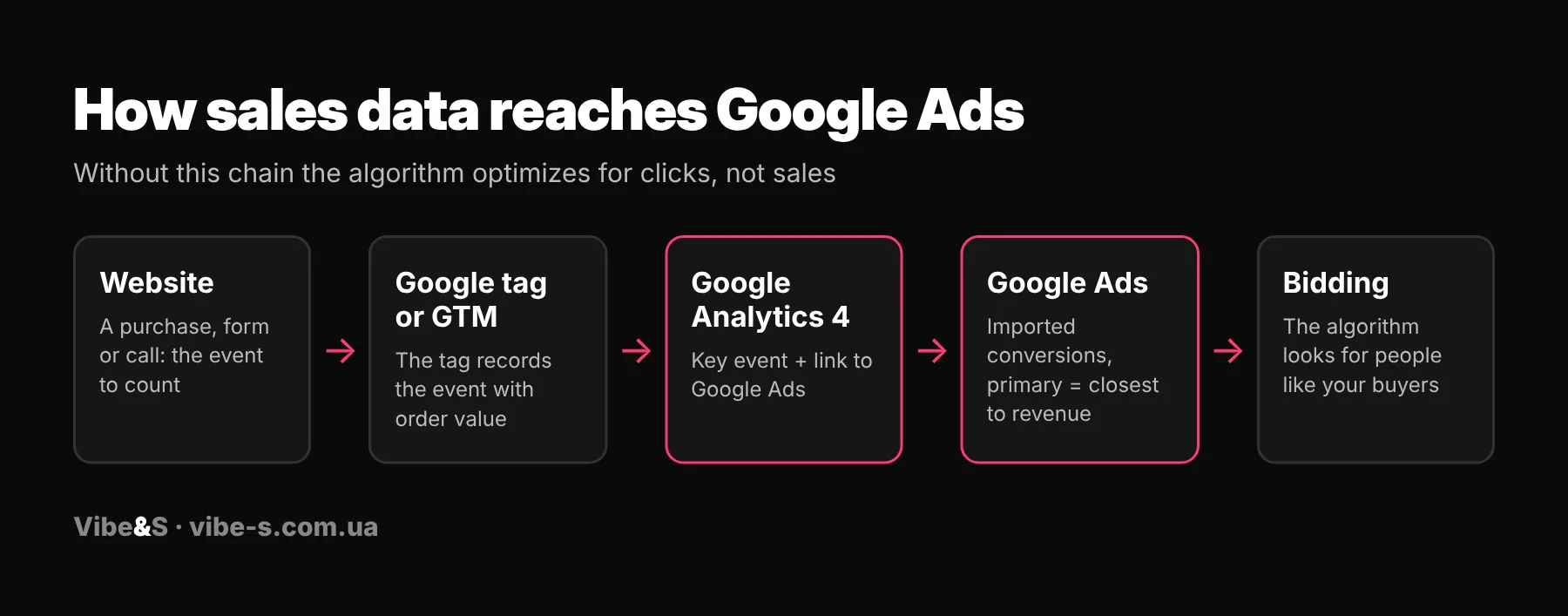
What to connect and how:
- Google tag or Google Tag Manager on every page. Shopify, WooCommerce and most platforms have ready-made integrations. If GA4 is already installed, the tag is often already there.
- Google Analytics 4. Create key events: purchase (with order value), form submission, messenger or phone click.
- Link GA4 and Google Ads. In GA4: Admin → Product links → Google Ads links. Then key events can be imported into Google Ads as conversions.
- Auto-tagging. In Google Ads: Admin → Account settings → Auto-tagging, turned on. Without it GA4 can’t tell that a visitor came from an ad.
- Enhanced conversions. Send hashed email or phone from forms and orders for more accurate sales tracking, especially when browsers block cookies.
- Consent Mode v2. Required if ads run in Europe; without it Google limits data for personalized ads.
| Business type | Primary conversion | Secondary |
|---|---|---|
| Online store | Purchase with order value | Add to cart, begin checkout |
| Services, clinics, education | Form submission, call | Messenger click, contact page view |
| B2B, high-value deals | Qualified lead from the CRM | All website leads |
Mark only one conversion as primary, the one closest to revenue. Keep the rest secondary so they don’t skew optimization.
Step 3. Which campaign type to choose
| Campaign type | When to choose it |
|---|---|
| Search | Services, lead generation, brand. The most control over search terms. |
| Shopping | Stores with a Merchant Center feed, especially at the start: you can see which searches trigger products. |
| Performance Max | Stores with steady sales and a good feed. Shows ads everywhere: Search, YouTube, Gmail, partner sites. |
| Demand Gen and YouTube | When you need to create demand for a new product, not just capture existing demand. |
| Display | Remarketing and reach. Usually not the first priority for sales from scratch. |
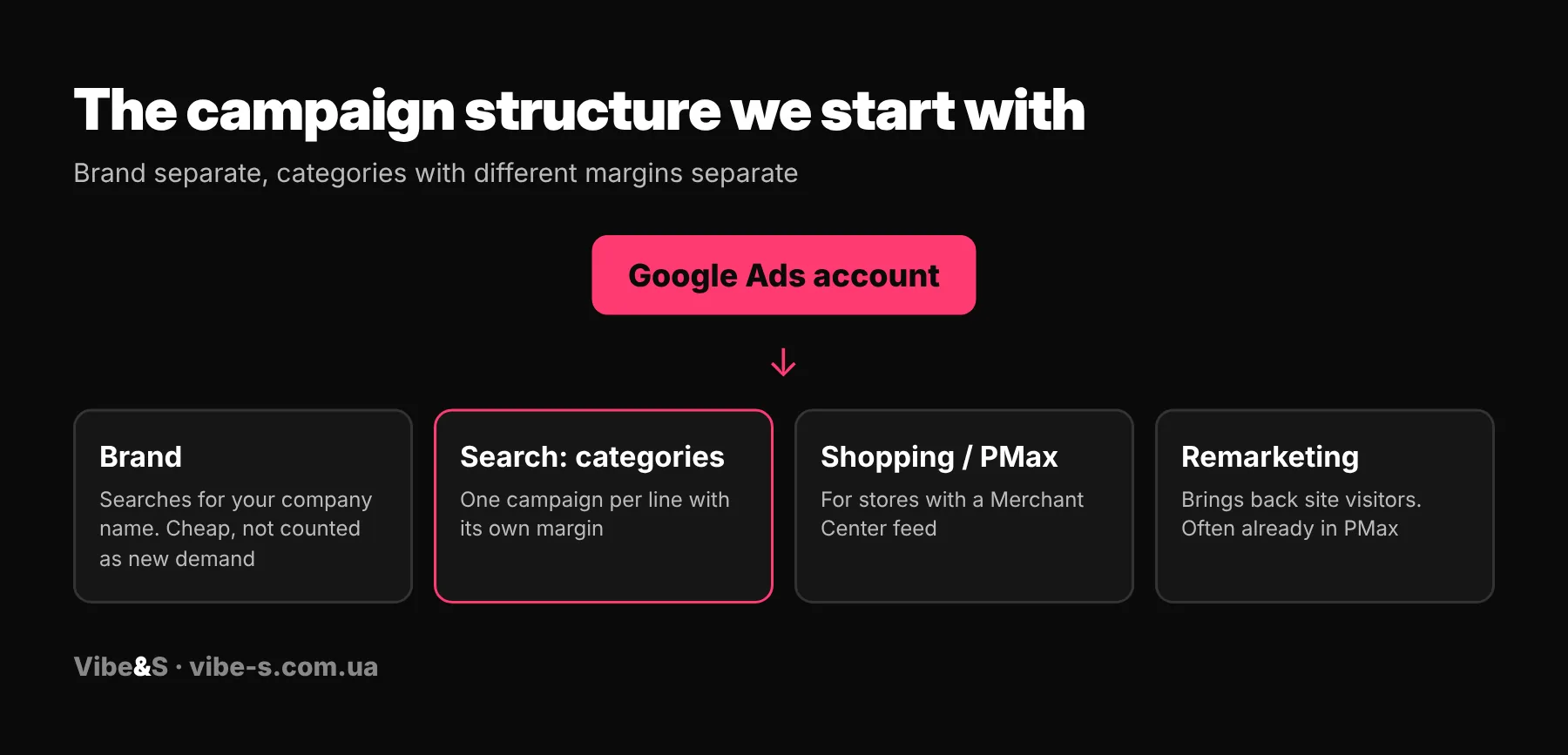
Don’t put everything into one campaign: brand separate, categories with different margins separate. Then you can see what actually makes money and split budget accordingly.
Step 4. Keywords, match types and negatives
Target searches with buying intent: “buy”, “price”, “near me”, a product or service name with a city. Broad searches without intent bring cheap clicks but rarely sales.
| Match type | How it works | When to use |
|---|---|---|
| Exact [buy sofa] | Searches with the same meaning | Best keywords with proven sales |
| Phrase “buy sofa” | Search contains the meaning of the phrase | The core at the start |
| Broad buy sofa | Any related searches | Only with conversion-based bidding and enough data |
From day one add negatives: “free”, “DIY”, “jobs”, “course”, “what is”, “reviews” (unless that’s your product), plus products you don’t sell. Then review the search terms report daily and keep adding.
Prefer to hand setup and management to a team? See how much a PPC agency costs.
Step 5. Ads and assets
A responsive search ad is built from up to 15 headlines and 4 descriptions. Write different angles: price, benefit, guarantee, delivery time, city name. Always add assets: sitelinks, callouts, prices, phone, logo and images. They make ads bigger and more visible, and clicks cheaper.
Send people not to the home page but to the product or service page that matches the search.
Step 6. Campaign settings we always check
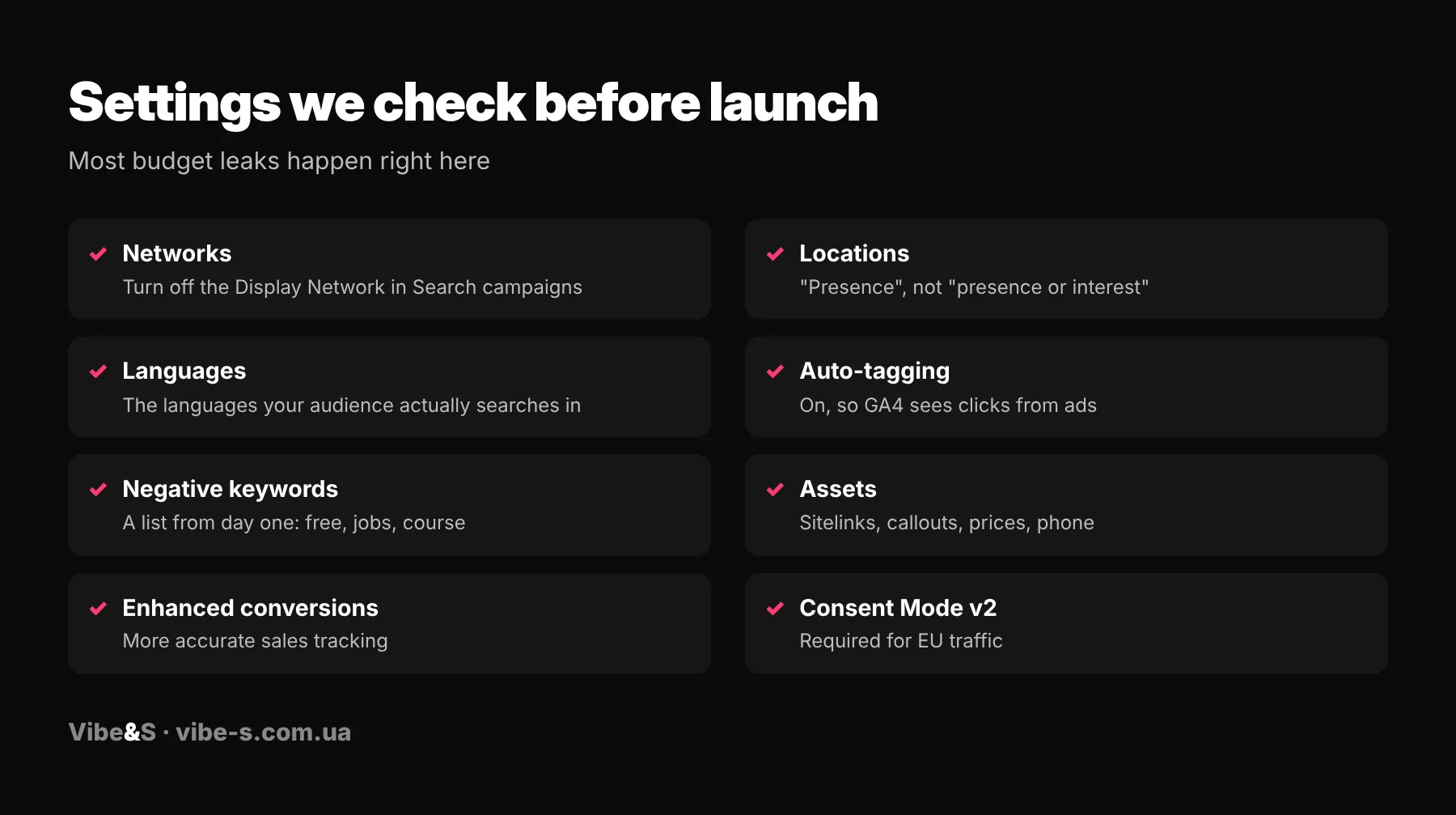
- Networks. Google turns on the Display Network in Search campaigns by default. Turn it off, or part of the budget goes to banners on third-party sites.
- Locations. In advanced location options choose “Presence: people in or regularly in your targeted locations”. “Presence or interest” also shows ads to people abroad who only showed interest in your region.
- Schedule and devices. Don’t restrict them at the start; after 2–3 weeks check when and on which devices sales come in.
Step 7. Budget and bidding
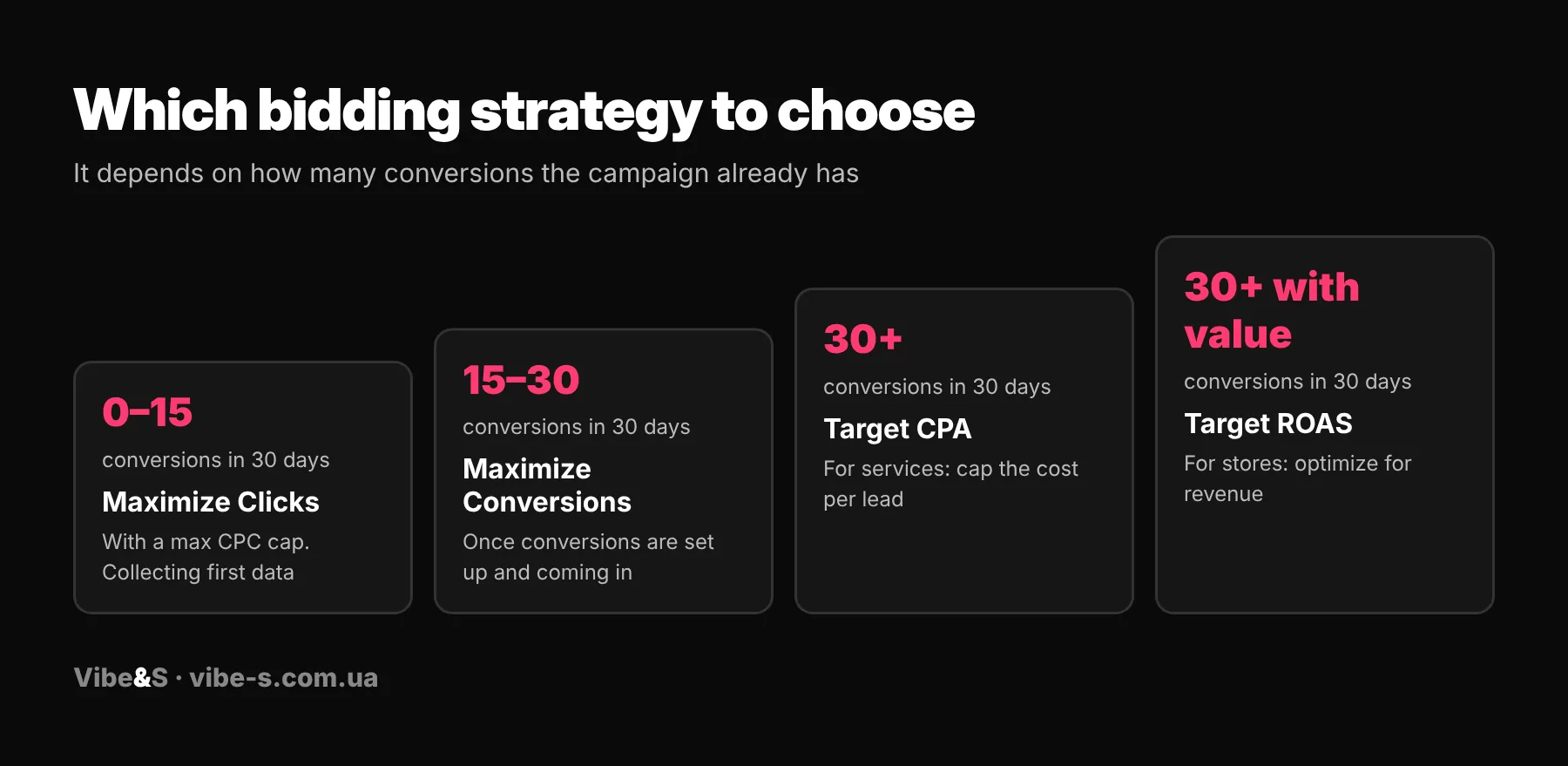
At the start, with no data yet, use Maximize Clicks with a max CPC cap. Once conversions are set up and coming in, switch to Maximize Conversions. From about 30 conversions a month you can move to target CPA (services) or target ROAS (stores). Don’t raise the budget sharply in the first weeks: the campaign is learning, and a budget jump resets that. Add 20–30% every few days instead.
Step 8. Merchant Center for stores
Product ads need Google Merchant Center and a product feed: titles, prices, availability and images. Merchant Center is linked to Google Ads in its settings under Apps and services → Google Ads. Product titles in the feed should match what people search for, including brand, model, color or size. More in our Google Merchant Center and Google Shopping guide.
Step 9. The first 14 days after launch
- Check search terms daily and add negatives.
- Make sure conversions come through and compare them with real leads or orders.
- Don’t change everything at once: campaigns need 1–2 weeks to learn.
- Pause ads and keywords that spend without converting.
We judge payback only after a few weeks, looking not just at ad account ROAS but at ROMI and real payback based on sales. Why the numbers differ is explained in what ROAS is.
Mistakes we see most after a DIY setup
- A page view or a click is set as a conversion, so the account shows results that don’t exist.
- The Display Network is on together with Search, and budget goes to partner sites.
- Locations set to “presence or interest”, so ads show abroad.
- No negative keywords, so ads show on informational searches.
- Ads lead to the home page instead of the product or service page.
- All products sit in one Performance Max campaign with no split by margin.
If you’d rather not do it yourself, we can set up and manage your ads. See Google Ads management at Vibe&S. If your ads are already running, start with a free audit.
FAQ
Can I set up Google Ads myself?
Yes. What matters most is getting conversions, negative keywords and location settings right. That’s where most budget gets lost.
Google tag or Google Tag Manager?
For a simple site, the Google tag or a ready-made platform integration is enough. Tag Manager is handier when there are many events or the site changes often.
How long does setup take?
Our launch takes up to 5 business days once access and the website are ready. For a store with a feed, a lot depends on the state of products in Merchant Center.
What is the minimum Google Ads budget?
We recommend from $1,500 per month for Europe and the USA. With less, campaigns lack data to learn.
When will I see first results?
First data shows on days 10–14. Judge payback after a few weeks.
Search or Performance Max: which to start with?
For services, Search. For a store with a feed, often Shopping or Performance Max together with Search for categories and brand.